

If you run an ecommerce store of adult products, getting it indexed by Google can be challenging, especially when you have hundreds or thousands of product pages. You may publish new listings, update product descriptions, and add fresh inventory, only to find that some products never appear in search results.
The problem is not always your content. Google must discover each URL, crawl the page, understand its content, and decide whether it should be included in its index. Technical barriers, duplicate descriptions, weak internal links, and incorrectly configured age-verification systems can delay this process.
For adult retailers, resolving these issues is particularly important because product discovery depends heavily on organic search visibility. By improving crawlability, page quality, and site structure, you can help Google discover your products more efficiently and increase their chances of appearing in relevant search results.
Quick Answer
To get adult retail products indexed faster, submit an XML sitemap, improve internal links, check Google Search Console, remove crawl barriers, write unique product descriptions, and use accurate product structured data.
- Check Whether Google Has Indexed Your Product Pages
- Submit an Accurate XML Sitemap
- Make Sure Age Verification Does Not Block Googlebot
- Improve Internal Linking to Product Pages
- Write Unique and Useful Product Descriptions
- Use Product Structured Data Correctly
- Fix Duplicate URLs and Canonicalization Problems
- Improve Page Speed and Mobile Accessibility
- Manage Out-of-Stock and Discontinued Products Properly
- Monitor Indexing and Prioritize High-Value Products
- Final Takeaway
Check Whether Google Has Indexed Your Product Pages
Before making changes, identify which product URLs are missing from Google Search. A page that does not appear when you search for its product name is not necessarily unindexed; it may simply rank too low to be visible.
Start with Google Search Console, which provides information about how Google discovers and processes your website.
Follow These Steps:
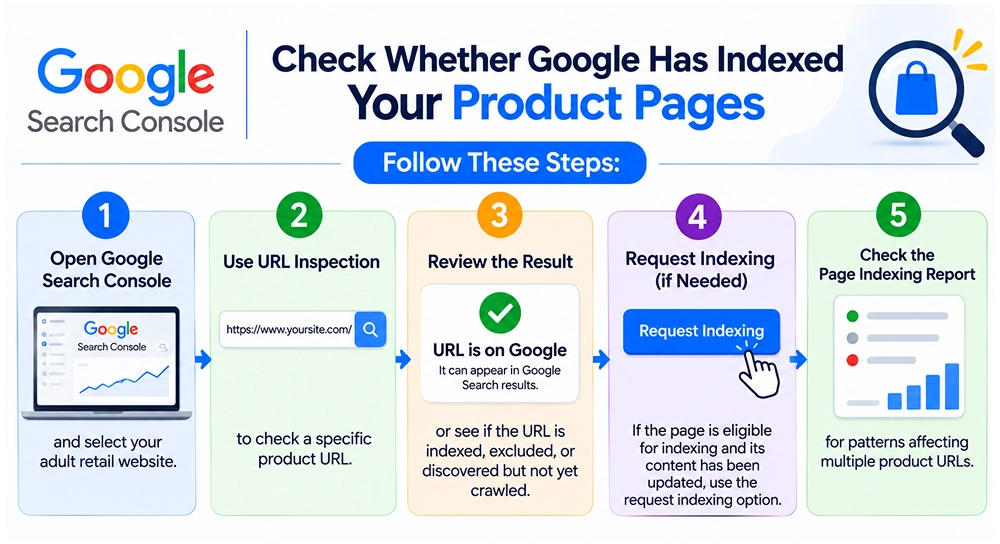
Pay attention to the exact status. ‘Discovered – currently not indexed’ means Google knows about the URL but has not indexed it. ‘Crawled – currently not indexed’ means Google visited the page but did not include it in the index at that time.
These statuses require different responses. The first may point to crawl prioritization or discovery issues, while the second may indicate duplication, low-value content, or other quality concerns.
Requesting indexing is useful for individual priority pages, but it does not guarantee inclusion or a specific indexing time.
Submit an Accurate XML Sitemap
An XML sitemap helps Google discover important product URLs, especially when your store has a large inventory or adds new products regularly.
Create a sitemap that includes the canonical URLs of indexable product pages. If your store has thousands of listings, use separate sitemaps for products, categories, and other important page types where appropriate.
Make sure your product sitemap:
- Includes URLs that return a successful HTTP 200 response.
- Excludes redirected URLs, error pages, and pages blocked from indexing.
- Uses canonical URLs rather than tracking parameters or duplicate variants.
- Updates when products are added or when important URLs change.
- Contains accurate last-modified dates when meaningful changes occur.
Submit the sitemap through Google Search Console and monitor whether Google can fetch and process it.
Remember that a sitemap is a discovery signal, not an indexing guarantee. Google may crawl a URL from your sitemap without adding it to search results.
For large adult ecommerce stores, automated sitemap generation is usually more reliable than manually updating product URLs. Check that your ecommerce platform or sitemap plugin handles discontinued products, product variants, and canonical tags correctly.
Make Sure Age Verification Does Not Block Googlebot
Age-verification systems are important for many adult retail businesses, but poorly implemented gates can prevent search engines from accessing product content.
For example, a verification overlay might cover the page while the underlying product content is missing from the initial HTML. A redirect could send every visitor, including Googlebot, to a generic verification page. Some systems may also block crawling through server rules or access restrictions.
Audit your age-verification setup by checking:
- Whether product URLs return the correct HTTP response to Googlebot.
- Whether the product title, description, and other important information are accessible in rendered page content.
- Whether verification redirects create redirect loops or hide the destination page.
- Whether robots.txt or security software accidentally blocks essential resources.
- Whether the page works without requiring a search engine crawler to submit a form or complete an interactive step.
Use URL Inspection and its available live test to examine how Google can access and render a page. Review server logs if you need to investigate repeated crawling failures.
Do not serve Googlebot a special version of a page that differs deceptively from what eligible human visitors receive. The objective is to make the same legitimate product information accessible to search engines while maintaining appropriate age controls for users.
Improve Internal Linking to Product Pages
Google discovers many ecommerce URLs by following links from one page to another. If a product is only accessible through your store’s internal search box, a filter, or a complicated JavaScript interaction, Google may struggle to find it.
Build a clear navigation structure that connects your homepage, category pages, subcategories, and individual product listings.
For example:
Homepage → Adult Wellness → Personal Massagers → Individual Product Page
Use standard crawlable links with descriptive anchor text. Link to important products from relevant category pages, related-product sections, buying guides, and other useful content.
Prioritize products that matter most to your business. Bestsellers, newly launched products, high-margin items, and products with meaningful search demand should not be buried deep within your site.
Avoid creating hundreds of unnecessary links simply to manipulate crawling. Instead, make navigation useful for shoppers and easy for search engines to follow.
If your inventory is large, review category pagination and product-loading behavior. Products loaded only after users click a button or enter a search query may not be discovered as reliably as products linked directly in crawlable HTML.
A logical internal-linking structure also helps Google understand which categories and products are important within your store.
Write Unique and Useful Product Descriptions
One common problem in adult ecommerce is the use of manufacturer-provided descriptions across multiple retailers. When many stores publish nearly identical product copy, individual pages may offer little distinctive value.
Google can crawl these pages without necessarily choosing to index all of them.
Create product descriptions that answer practical questions shoppers have before buying. Explain what the product is, its main features, materials, dimensions, compatibility, care instructions, and other relevant specifications.
For example, instead of repeating a generic description of a personal massager, provide accurate information about its size, operating modes, charging method, waterproof rating where verified, and cleaning requirements.
Use this checklist for each important product page:
- Write an original title that identifies the product clearly.
- Include accurate specifications and useful purchasing details.
- Explain meaningful differences between similar models.
- Add relevant images with descriptive alternative text.
- Answer common questions without adding unnecessary filler.
- Keep product availability and pricing information accurate.
Do not generate hundreds of nearly identical pages by changing only a product name or keyword. If several URLs represent the same item, consolidate them where appropriate or use canonical tags to identify the preferred version.
The goal is not simply to make every page longer. It is to make each indexable product page useful enough to stand on its own.
Also Read: Adult Website Content Strategy
Use Product Structured Data Correctly
Product structured data helps Google interpret information such as a product’s name, price, availability, and other supported attributes.
For adult retail websites, structured data should describe the actual product accurately. It cannot force Google to index a page, guarantee enhanced search results, or override content and quality requirements.
Depending on the page and implementation, relevant markup may include Product and Offer properties. Include supported fields that genuinely apply, such as the product name, image, price, currency, and availability.
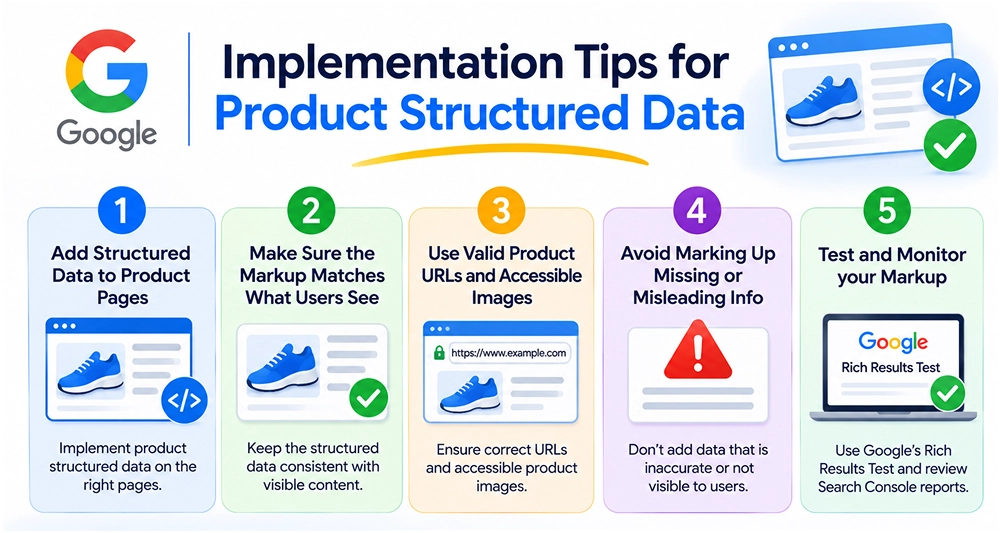
Implementation Tips:
- Add structured data to the appropriate product pages.
- Make sure the markup matches the information visible to users.
- Use valid product URLs and accessible product images.
- Avoid marking up information that is missing, inaccurate, or misleading.
- Test the markup with Google’s Rich Results Test and review Search Console reports where available.
For ecommerce sites, placing important product markup in the initial HTML can help Google process it reliably.
Remember that valid structured data makes a page eligible for certain search features; it does not guarantee that those features will appear. Indexing and ranking still depend on Google’s broader systems.
Fix Duplicate URLs and Canonicalization Problems
Adult stores often create multiple URLs for the same product through filters, sorting options, tracking parameters, product variants, and category paths.
For example, the same item might be accessible through a main product URL, a filtered category URL, and a URL containing tracking parameters. If these pages provide substantially identical content, Google may choose only one version to index.
Identify the preferred URL for each product and use consistent internal links, sitemap entries, redirects, and canonical tags to reinforce that choice.
Check for these common problems:
- Canonical tags pointing to unrelated products or categories.
- Multiple URLs returning identical product content.
- Product variants creating unnecessary duplicate pages.
- Internal links pointing to redirected or non-canonical URLs.
- Sitemap entries containing URLs that declare another page as canonical.
Use separate indexable pages for variants only when they provide a meaningful, distinct search experience, and your URL strategy supports them. Otherwise, consolidate duplicate versions appropriately.
Do not use robots.txt as a substitute for canonicalization. Blocking a URL from crawling can prevent Google from seeing the canonical tag on that page.
Improve Page Speed and Mobile Accessibility
Slow pages do not automatically remain unindexed, but performance problems can make crawling less efficient and create a poor experience for shoppers.
Adult retail websites sometimes use large product images, multiple scripts, third-party widgets, recommendation tools, and verification overlays. If these elements delay the main product content, they can complicate rendering and usability.
Compress product images, use modern image formats where suitable, reduce unnecessary scripts, enable caching, and improve server response times. Make sure product names, descriptions, and important links are available without requiring excessive user interaction.
Test representative product pages on mobile devices, not just the homepage. Check that navigation works, content remains readable, and important page elements are not hidden behind overlays.
Review Core Web Vitals and other performance data to identify measurable issues. Fix high-impact technical problems first rather than making cosmetic changes that do not improve accessibility or usability.
A fast, accessible product page gives both shoppers and search engines a more reliable experience.
Manage Out-of-Stock and Discontinued Products Properly
Product availability changes can affect how your store should handle individual URLs.
If an item is temporarily out of stock, keep the page available when it still provides useful information and the product is expected to return. Update its availability accurately and suggest relevant alternatives.
If a product has been permanently discontinued, decide whether the page still offers useful information or should be redirected to a genuinely equivalent replacement. If there is no suitable replacement and the page has no continuing purpose, returning a 404 or 410 response may be appropriate.
Audit your inventory feed, sitemap, structured data, and product availability information regularly so they remain consistent.
Monitor Indexing and Prioritize High-Value Products
Indexing improvements require ongoing monitoring. Google may need to revisit pages after technical changes, and not every valid product URL will be indexed.
Use Google Search Console to track indexing status, impressions, clicks, and search queries. Compare results before and after changes, and look for patterns across product categories rather than judging success by one URL.
Start with a manageable group of priority products. Fix their crawlability, improve their content, verify their canonical URLs, and request indexing when appropriate. Once the process works, apply the same checks systematically across your inventory.
Keep a record of URLs changed, technical fixes deployed, sitemap updates, and indexing outcomes. This makes it easier to identify which improvements are producing useful results.
If many valuable product pages remain unindexed despite being accessible and technically correct, investigate content quality, duplication, internal linking, and server logs before repeatedly submitting the same URLs.
For adult retailers, a structured technical audit can help uncover problems that a generic ecommerce checklist may overlook. Professional adult ecommerce SEO services at AdultSEM can help businesses review indexing issues, product-page optimization, site structure, and other technical SEO requirements specific to adult retail.
Final Takeaway
Getting adult retail products indexed by Google faster starts with making every important page easy to discover, crawl, and understand. Adult SEO experts use proven optimization techniques to submit accurate XML sitemaps, strengthen internal linking, check age-verification functionality, resolve duplicate URLs, improve product descriptions, and implement valid structured data.
Then use Google Search Console to monitor results and address recurring problems. No method guarantees instant indexing, but a technically accessible website with useful product pages gives Google clearer reasons to crawl and consider your inventory.
Focus first on your most valuable products, measure the results, and expand the improvements across your store.
Frequently Asked Questions
How long does Google take to index a new adult product page?
Google may index a product page within days, but some pages take weeks or longer, and others may never be indexed. Timing depends on crawlability, site quality, discoverability, and Google’s indexing decisions.
Does requesting indexing in Google Search Console guarantee inclusion?
No. Requesting indexing asks Google to recrawl a URL when possible. It does not guarantee indexing, ranking, or a specific timeframe. Resolve technical and content issues before submitting the page again.
Can an age-verification popup stop Google from indexing adult products?
Yes, if an age gate blocks crawling, redirects Googlebot incorrectly, or hides product content, indexing may suffer. Test representative URLs and ensure legitimate product information is accessible to Google without bypassing appropriate age protections.
Should every adult retail product have a unique description?
Ideally, every product page should provide distinctive, accurate information. Unique specifications, features, usage guidance, and compatibility details help shoppers distinguish products and reduce reliance on duplicated manufacturer descriptions.
Does an XML sitemap make Google index products faster?
An XML sitemap helps Google discover product URLs, especially on large stores. However, it does not guarantee indexing. Combine sitemap submission with crawlable internal links, accessible pages, accurate canonical tags, and useful product content.