

The answer depends on the different issues your website might be facing. These issues may include pages or blogs that are not indexed, problems with your robots.txt file, thin or duplicate content, or age verification that may prevent Google from accessing your website. There are many more possible reasons, which we uncover with an in-depth explanation in this blog.
It’s been a long time since you published your website. You consistently create new pages and publish blog posts, but when you search for your website on Google, nothing shows up.
Your hard work feels like it’s going to waste because potential customers aren’t finding you. Obviously, it’s a frustrating situation. You’ve already invested time and money in your website.
When you realize your website isn’t visible, you start searching for answers. Some say your website might have been penalized by Google, while others offer completely different explanations.
You start making changes, but nothing seems to work.
The reason? You’re not addressing the exact issue your website is facing. Instead, you’re acting on assumptions and trying different solutions without identifying the real problem.
So, stop here. Before making any changes, it’s important to understand the problem and then work on fixing it.
Your website might have thin content, while you’re focusing on technical issues instead. This not only wastes your time but can also leave you further behind your competitors.
The first step is to identify the problem you’re dealing with. Here are 10 common SEO issues that can keep your adult website out of Google Search, along with practical ways to investigate and fix them.
1. Google Has Not Indexed Your Adult Website
Your website is live, and every page seems to work fine. Until you checked. You found out your website is not showing in the search results.
This can happen when Google hasn’t discovered your website or hasn’t added its pages to the search index. Being online doesn’t automatically mean your pages will appear on Google.
To check this, you can start with a simple search.
Search for site:yourdomain.com on Google. Replace yourdomain.com with your actual domain name.
If you see your website’s pages in the results, it means Google has indexed at least some of your pages. Make sure you check individual URLs using the site: search as well.
But if nothing appears in the search results, further investigation is needed. First, make sure your website has been live for at least 48 hours.
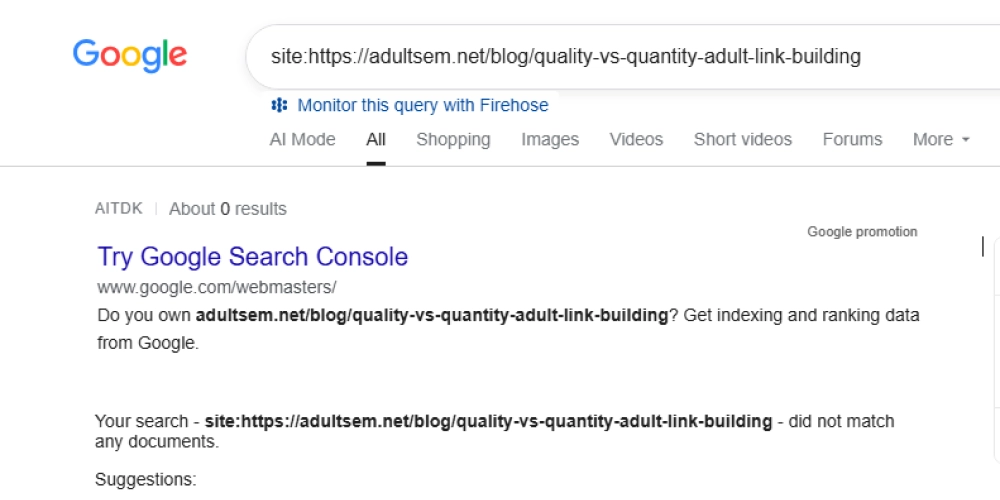
If your website URL isn’t indexed, investigate the issue further using Google Search Console. The site: search is useful for an initial check, but it isn’t a complete or definitive list of indexed pages.
Open the URL Inspection tool in Search Console and enter the URL of an important page. It can help you determine whether Google has indexed the page and identify reported issues.
If the page isn’t indexed, check whether Google can access it, review the indexing status, and submit your XML sitemap if you haven’t already. You can also request indexing for an eligible page, although this doesn’t guarantee that Google will index it.
What to do: Check the indexing status before changing your content or adult link building. You need to know whether Google can find your pages before you can work on improving their rankings.
2. Your Robots.txt File or Noindex Tag Is Blocking Google
Sometimes, the problem isn’t with your content. It’s a setting that prevents Google from accessing or indexing it.
This is more common than many website owners expect, particularly after a redesign, migration, or website launch. A developer might use a temporary restriction during development and forget to remove it when the site goes live.
Two things deserve your attention:
- Robots.txt: This file gives crawlers instructions about which URLs they can access. An incorrect Disallow rule can prevent Googlebot from crawling important pages.
- Noindex tag: A noindex directive tells search engines not to include a page in their search results.
For example, a page might contain this directive in its HTML:
If that tag appears on a public video category or landing page that you want to rank, it could explain why the page isn’t showing up.
Check your robots.txt file and inspect the page’s HTML source or HTTP response headers. Google Search Console can help you investigate the page’s indexing status, too.
One important detail: blocking a URL in robots.txt doesn’t remove it from Google’s index by itself. Google may still know that the URL exists. If you need a page removed from search, use the appropriate indexing controls rather than relying on robots.txt alone.
What to do: Remove unintended indexing restrictions from pages you want Google to show. Keep deliberate restrictions in place for private, administrative, or otherwise unsuitable pages.
3. Your Age-Verification System Is Preventing Google From Accessing Content
Adult websites need to integrate age verification to restrict access to underage users and comply with the laws and regulations applicable to their business.
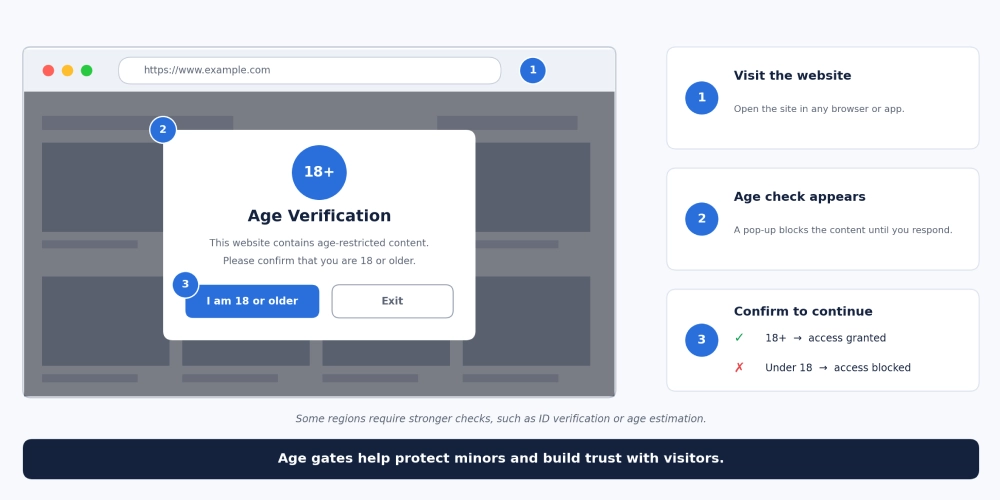
However, the way you implement it can create an SEO problem.
Imagine someone opens a video category page. Instead of seeing the page’s content, they encounter a full-screen age-verification overlay. If Google’s crawler cannot access the underlying page content because of the way that system works, it may struggle to understand what the page offers.
The issue isn’t age verification itself. It’s whether the implementation interferes with crawling, rendering, or access to the content Google is supposed to evaluate.
Check a few things:
- Can Googlebot access the page without getting trapped in a verification loop?
- Does the page return an appropriate HTTP status?
- Is meaningful page content available in the rendered HTML?
- Does the verification system block essential scripts or resources?
- Does the page behave as expected when tested through Google Search Console’s live URL inspection?
You should also avoid showing Googlebot a different version of the page simply to manipulate rankings. That can become cloaking, which violates Google’s spam policies.
What to do: Review the age-verification flow with your developer. Preserve the necessary access restrictions while ensuring that eligible public pages can be crawled and understood appropriately.
4. SafeSearch Is Filtering Your Adult Website From Search Results
This is one of the first things worth investigating when your adult website appears to be missing from Google.
SafeSearch helps users filter explicit content from their search results. Depending on the user’s settings and Google’s classification of a page, sexually explicit material may not appear in filtered results.
Here’s where the confusion starts: a page can be indexed by Google and still be filtered from a particular user’s search results.
That means you could spend hours rewriting titles, adding internal links, or building backlinks without addressing the actual reason you cannot see the page.
Start by comparing the results with different SafeSearch settings. If your pages appear when SafeSearch is off but disappear when filtering is enabled, that gives you a useful clue. It doesn’t prove that every missing page has the same cause, but it helps narrow the investigation.
Google also recommends using the appropriate adult content classification for pages that contain specific material. For example:
This metadata helps Google identify adult content. It isn’t a trick for getting higher rankings, nor does it guarantee how a page will be classified.
If you believe Google has incorrectly classified non-explicit content, follow its SafeSearch troubleshooting guidance.
What to do: Check SafeSearch before treating missing visibility as a deindexing issue. Make sure your pages are classified accurately, and remember that you cannot force explicit content to appear for users who choose to filter it.
5. Your Adult Content Is Thin, Duplicated, or Offers Little Original Value
Publishing more pages doesn’t necessarily mean you’ll get more organic traffic.
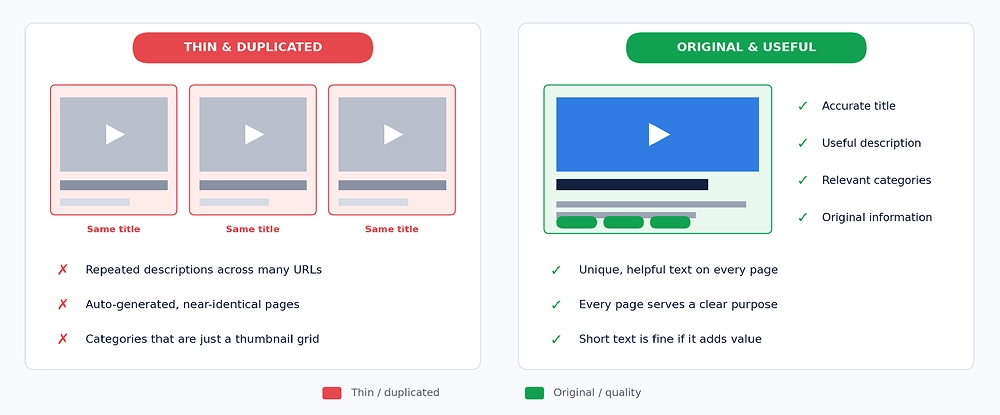
Consider an adult website with hundreds of video pages. Most have a similar title, a short generic description, and very little information beyond the embedded video. Another website offers the same videos but provides accurate titles, useful descriptions, relevant categories, and original information that helps visitors understand what they’re viewing.
The second website gives users and search engines more information to work with.
This doesn’t mean every page needs a long article. A video page can be perfectly useful with concise supporting text. The problem arises when pages are nearly interchangeable and offer little distinct value.
Look for issues such as:
- Repeated video descriptions across multiple URLs.
- Copied performer biographies or category descriptions.
- Hundreds of automatically generated pages with little useful information.
- Several pages targeting the same keyword without serving different needs.
- Category pages that contain little beyond a grid of thumbnails.
Review your pages individually. Which ones serve a clear purpose? Which ones overlap? Which ones could be improved, combined, or removed because they provide no meaningful value?
Don’t add text just to reach a word count. Add information that genuinely helps visitors.
For more information on promoting adult content, read our blog: How Do I Promote Adult Content?
What to do: Make important pages distinct and useful. Consolidate unnecessary duplication, improve weak descriptions, and avoid publishing large numbers of near-identical pages simply to target more keywords.
6. Your Pages Don't Match What People Are Searching For
Your adult website may be indexed correctly, contain original content, and have no obvious technical problems. Yet it still struggles to rank.
One possible reason is a mismatch between the page and the searcher’s intent.
Suppose you want a category page to rank for a specific type of adult video. But its title is simply “Watch Videos Online,” and the rest of the page gives Google little information about the actual category.
The page may be too vague to compete for the more specific searches you want to attract.
Keyword targeting also becomes a problem when several pages compete for the same terms. For example, you might have multiple category pages with nearly identical titles and descriptions. If they serve the same purpose, Google may struggle to determine which page is the best result.
Here’s how to investigate:
- Review the actual search queries bringing impressions to your pages in Google Search Console.
- Compare the wording of those queries with your page titles, headings, and content.
- Check whether the page serves the same intent as the results competing for that search.
- Identify pages targeting the same terms and determine whether they serve genuinely different purposes.
- Improve titles and descriptions so they accurately explain what each page offers.
Avoid stuffing keywords into every heading. A clear title that describes the page is more useful than an awkward string of search terms.
What to do: Give each important page a clear purpose. Match its content to the searcher’s needs rather than trying to rank every page for the same broad keyword.
7. Poor Site Architecture Makes Important Pages Difficult to Find
A large adult website can have thousands of URLs. Without a clear structure, important pages can become buried beneath unnecessary categories, tags, and filters.
This creates two problems. Visitors may struggle to find what they want, and Google may have difficulty discovering or understanding the relationships between pages.
Imagine your website has a valuable category page, but the only way to reach it is through several layers of navigation. Worse, no other page links to it. The URL might exist in your database and even appear in a sitemap, but it is still poorly connected to the rest of the site.
These are the issues to look for:
- Orphan pages: URLs with no internal links pointing to them.
- Excessive navigation depth: Important pages buried too far down the site structure.
- Unhelpful internal links: Generic anchor text that provides little context.
- Unnecessary tag pages: Hundreds of low-value URLs that add little to the browsing experience.
- Weak category relationships: Pages that aren’t linked in a logical way.
A well-organized structure helps visitors move naturally from broader categories to more specific pages. Internal links also help Google discover URLs and understand their context.
An XML sitemap can support URL discovery, but it doesn’t replace internal linking.
What to do: Audit your site architecture. Make sure important pages are accessible through crawlable internal links, organize categories logically, and remove unnecessary structural clutter.
8. Google Cannot Access Your Adult Videos or Other Important Media
For an adult website that relies on video traffic, a working video player doesn’t necessarily mean Google can access the video itself.
The player may load correctly for visitors while the underlying media file is blocked by a CDN, authentication requirement, hotlink protection, or crawler restriction. Google might be able to read the surrounding page but still struggle to fetch and process the video.
This matters if you want your pages to qualify for video-related search visibility.
Start by checking whether the page and its video resources are accessible. Then review the information associated with each video.
Important details include:
- A descriptive and accurate video title.
- A relevant thumbnail that Google can access.
- A useful page description.
- Video metadata, where appropriate.
- A video sitemap if your website has enough video content to justify one.
- Correct canonical URLs and consistent page information.
Also, distinguish between a page being indexed and its video being indexed or eligible to appear in video search results. These are not the same thing.
A page may appear in ordinary search results without its video appearing as a video result.
What to do: Check video accessibility separately from page indexing. If your CDN or hosting setup blocks important media resources, work with your developer or hosting provider to resolve the restriction without compromising content security.
9. Technical Errors and a Poor Mobile Experience Are Hurting Your Website
Sometimes, the problem is more basic than keywords or content quality.
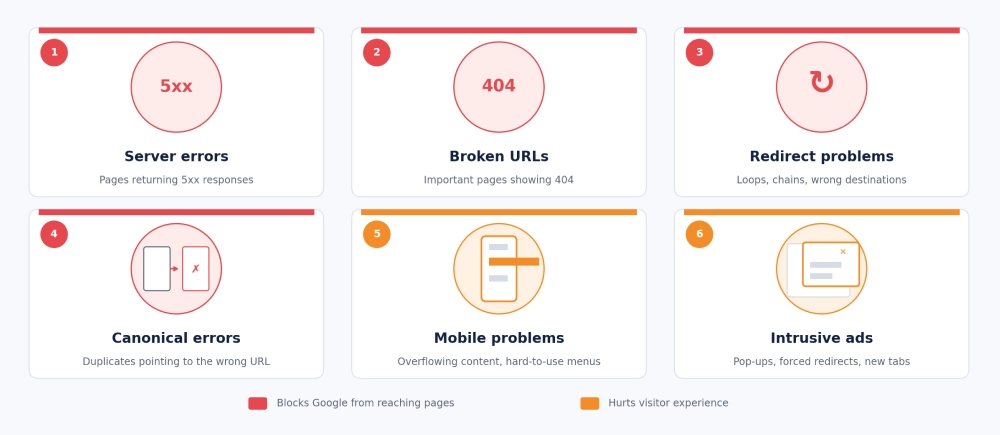
Your server might return errors. Redirects might send Googlebot through unnecessary steps. Canonical tags might point to the wrong URLs. Pages may also load slowly or become difficult to use on mobile devices.
Any of these issues can complicate crawling or weaken the experience your website provides.
Start with the errors that prevent Google from accessing the right pages.
Check for:
- Server errors: Pages returning HTTP 5xx responses.
- Broken URLs: Important pages returning unintended 404 errors.
- Redirect problems: Loops, chains, or redirects to irrelevant destinations.
- Canonical errors: Duplicate pages pointing to an incorrect preferred URL.
- Mobile usability problems: Content that overflows the screen or navigation that is difficult to use.
- Intrusive advertising: Pop-ups or overlays that make content difficult to access.
For an adult website, advertising deserves particular attention. Aggressive pop-ups, repeated redirects, and unexpected new tabs can frustrate visitors and create trust issues.
Google’s Core Web Vitals can help you assess loading performance, responsiveness, and visual stability. However, a poor score alone doesn’t explain why a page is missing from the index, and improving performance doesn’t guarantee higher rankings.
What to do: Use Google Search Console, server logs, URL Inspection, and performance testing to identify the real problems. Fix access and indexing errors first, then improve the visitor experience.
10. Your Website Has Weak Authority or Violates Google's Spam Policies
Even when your adult website is technically sound, it may struggle to compete with established websites that have stronger content, better internal linking, and more relevant external references.
But there’s an important distinction here: a website with few backlinks isn’t automatically penalized by Google.
The real question is whether your pages provide enough value and relevance to compete for the searches you’re targeting.
Review your website for two types of problems.
Weak competitive signals
- Few relevant websites link to your useful content.
- Your pages offer less information than competing results.
- Your site has limited topical coverage for the subjects it serves.
- Your brand has little recognition in its market.
Potential spam or security issues
- Purchased links intended to manipulate rankings.
- Scraped or automatically generated pages with little original value.
- Doorway pages created primarily to capture search traffic.
- Keyword stuffing or deceptive redirects.
- Hacked pages containing unexpected spam content.
Open Google Search Console and check the Manual Actions and Security Issues reports. If Google has issued a manual action or identified a security problem, follow the instructions provided in the relevant report.
If you find spammy practices, correct them rather than trying to hide them. Where a manual action has been issued, submit a reconsideration request after addressing the stated problems.
If there is no manual action, don’t assume a penalty exists simply because rankings have dropped. Investigate content quality, relevance, technical health, and competition before deciding what to change.
What to do: Build useful content, earn relevant links naturally, and resolve any documented policy or security issues. Authority takes time, and no backlink strategy can guarantee rankings.
How to Find Out Why Your Adult Website Is Not Showing on Google
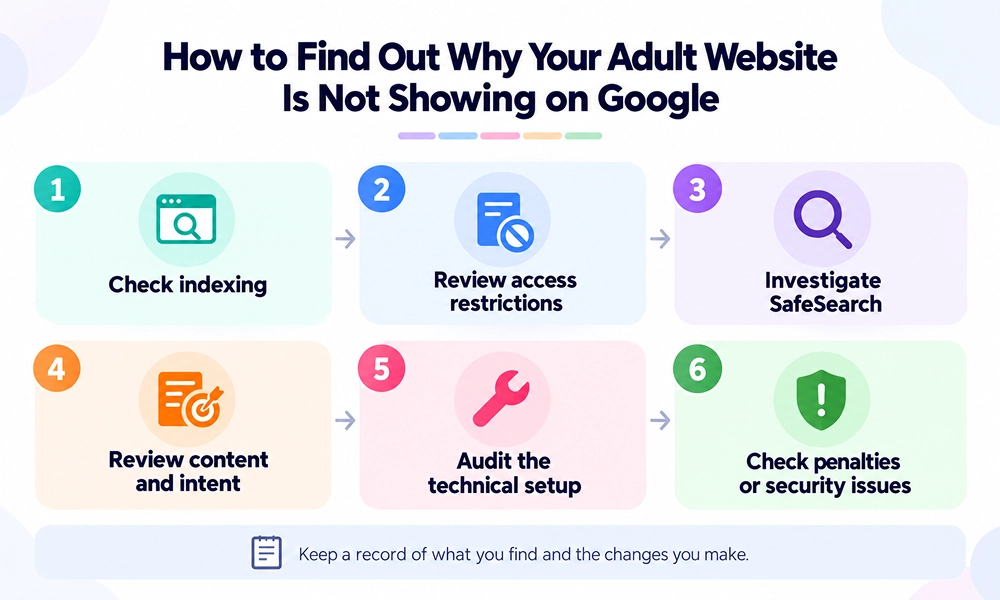
You don’t need to fix all ten issues at once. In fact, doing so without identifying the cause can waste time and make it harder to understand which changes actually helped.
Follow this order:
- Check indexing: Use Search Console to inspect important URLs and determine whether they’re indexed.
- Review access restrictions: Check robots.txt, noindex directives, HTTP responses, and age-verification behavior.
- Investigate SafeSearch: Compare results with different SafeSearch settings and follow Google’s troubleshooting guidance if the classification appears incorrect.
- Review content and intent: Identify duplicate pages, thin content, overlapping keywords, and mismatches between pages and search queries.
- Audit the technical setup: Check redirects, canonical tags, server errors, internal links, and video accessibility.
- Check for documented penalties or security issues: Review the relevant Search Console reports before assuming that Google has penalized the website. (Read our guide to recovering your website if Google has penalized it. )
Keep a record of what you find and the changes you make. Otherwise, you might fix several things at once without knowing which issue was responsible.
Final Thoughts!
We have discussed 10 common reasons why your adult website may not be showing on Google. Go through each point and check which issues apply to your website.
If you’ve checked these issues but still can’t find the right solution, you may need a stronger SEO strategy to improve your rankings. An experienced adult SEO agency can help you tackle these challenges, improve your website’s visibility, attract relevant traffic, and turn visitors into customers.
Frequently Asked Questions
1. Why is my adult website not indexed by Google?
Your website might be difficult for Google to discover, blocked from crawling, marked with a noindex directive, or inaccessible because of technical errors. Duplicate or low-value pages can also remain outside the index. Check the URL Inspection tool in Google Search Console to identify the reported status of individual pages.
2. Does Google penalize adult websites?
No, adult content is not automatically prohibited from Google Search. However, explicit content may be filtered by SafeSearch, and adult websites must still follow Google’s general spam policies. A visibility problem doesn’t necessarily mean the website has received a penalty.
3. Can SafeSearch prevent my adult website from appearing?
Yes. SafeSearch can filter explicit content from users’ search results. This is different from deindexing, so check whether the pages are indexed before assuming they have been removed from Google.
4. How long does it take for Google to index an adult website?
There is no guaranteed timeline. Google may discover and index some pages relatively quickly, while others take longer or aren’t indexed at all. Submitting a sitemap and requesting indexing can help Google discover eligible pages, but neither guarantees inclusion.
5. Should I hire an adult SEO agency if my website isn't ranking?
Consider specialist help if you cannot identify the cause, especially when the problem involves a large site, complex video infrastructure, a migration, SafeSearch classification, or a manual action. Before hiring an adult agency, ask for a diagnosis supported by evidence rather than promises of guaranteed rankings.