

Most people spend thousands of dollars on fancy website design and advanced features; of course, it is important, but that doesn’t mean compromising on SEO aspects like loading speed, tags, linking, navigation, and mobile-friendliness.
When developing an adult website, it is crucial to focus more on the foundation. The foundation of a website plays a crucial role in SEO practices. In restricted niches like adult streaming, tube, and ecommerce websites, which mostly rely on organic traffic, it is very important to understand how your adult website design affects SEO.
Design → UX → Crawlability → Discoverability → Search visibility → Conversion
Why Website Design Matters for Adult SEO
Website design is more than colors, typefaces, and visual identity. It covers information architecture, navigation, page structure, HTML coding, responsiveness, image treatment, internal linking, rendering capabilities, canonicalization, breadcrumb trails, structured data, intrusive features, and conversion paths.
Google’s guidelines point to crawlable links, logical URLs, mobile-friendliness, and a content-centric approach as the basic principles of SEO. And for a grown-up publisher or company, the critical question that must be asked is not “Does this design seem contemporary?” but “Does this design reveal the website’s purpose and content connections clearly?”
1. Website Architecture
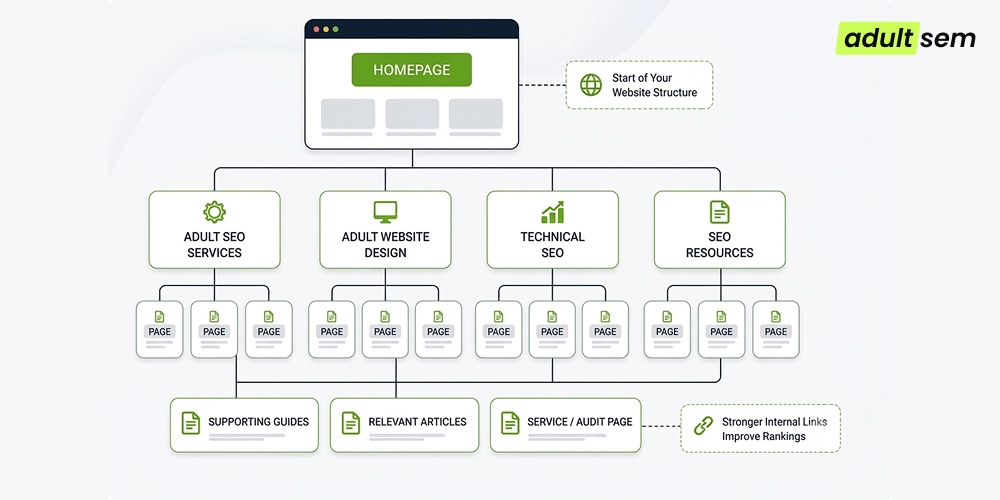
The architecture is what lies behind the interface. The organization of the site according to a logical hierarchy allows users to know how to proceed from general categories to particular pages and how crawlers can get to related URLs. According to Google, links allow it to find new pages and learn about their relevance.
Imagine an adult SEO site with a homepage, an SEO service category, technical SEO content, website-design guidance, and supporting articles. A sensible structure might look like:
Homepage
↓
Adult SEO Services → Adult Website Design → Technical SEO
↓
Supporting guides → Relevant service/audit page
Problem |
What Happens |
Better Approach |
|---|---|---|
| Unnecessarily deep navigation | Important pages become harder for users and crawlers to reach. | Keep key commercial and informational pages within a clear, logical path. |
| Orphan pages | A page may exist in the CMS but have no useful internal route into it. | Give every important indexable page at least one contextual internal link. |
| Confusing URLs | URL patterns do not communicate the site hierarchy clearly. | Use logical, human-readable URL structures. |
| JavaScript-only navigation | Some links may be difficult for crawlers to parse reliably. | Use standard crawlable <a href> links for important destinations. |
2. Navigation Is More Than a UX Element
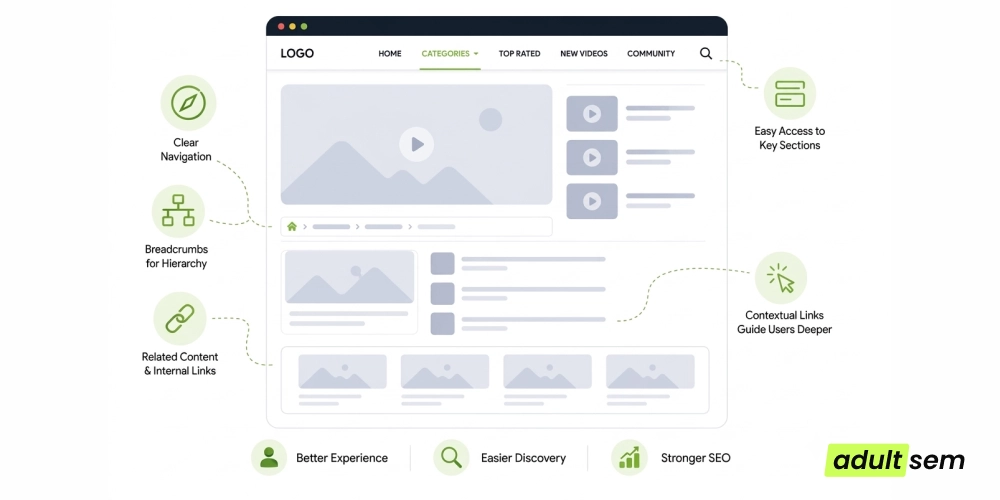
Navigation assists users in answering the basic question “where can I go next?” Effective navigation reveals the relationships between the pages. Main navigation reveals high-level categories; secondary navigation reveals subtopics; breadcrumbs reveal hierarchy; related content modules reveal semantic relationships between the pages; and contextual links move users from explanation to another helpful piece of information.
3. Mobile-First Design Is Essential
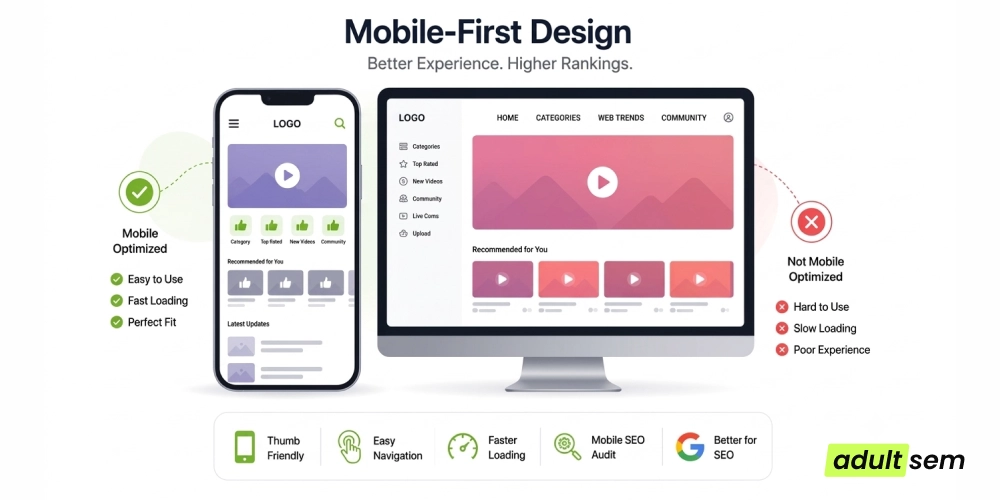
Google indexes and ranks using the mobile version of the site’s content. Therefore, mobile design becomes part of the technical platform, and not just an aesthetic adaptation of the desktop version. Google advises on responsive designs and advises against hiding the primary content behind any user action.
- Avoid the need to pinch and/or pan to see your content.
- Ensure that menus are clear and easily operable with the thumb.
- Provide sufficient space for controls to allow for easy tapping.
- Ensure primary content can be accessed without excessive user action.
- Verify sticky bars, overlays, and pop-ups on smaller screens.
- Deliver images of appropriate sizes to avoid delivering desktop-sized media on mobile pages.
- Ensure that the mobile version is substantially equivalent to the content you wish to index.
4. Page Speed and Core Web Vitals
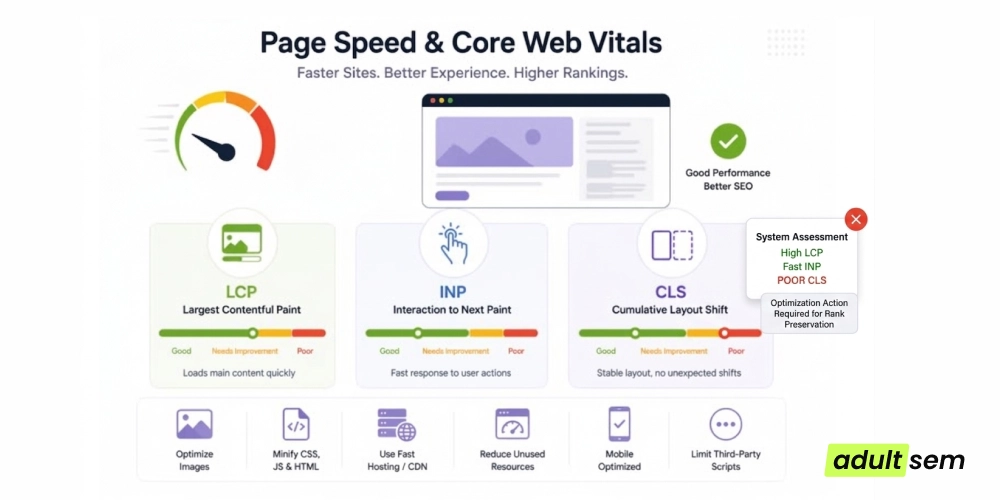
Performance is where design choices start being measured. Big hero images, third-party scripts, poorly optimized JavaScript, unoptimized fonts, and layout changes can all impact the speed at which the page will load and stabilize. Currently, there are three Core Web Vitals defined by Google:
Metric |
What It Measures |
Why Designers Should Care |
Common Design Problem |
|---|---|---|---|
| LCP | Loading performance of the largest visible content element. | The primary content should appear quickly. | Oversized hero images, slow fonts, render-blocking resources. |
| INP | How quickly the page responds to user interactions. | Menus, filters, and forms should feel responsive. | Heavy JavaScript, long tasks, excessive third-party scripts. |
| CLS | Unexpected visual movement during loading. | Users should not lose their place or misclick. | Images without dimensions, late-loading ads, injected UI. |
The nuance matters: Google says Core Web Vitals are used by its ranking systems, but also stresses that good scores do not guarantee top rankings and that page experience involves more than a single signal.
5. Images Can Help or Hurt Adult SEO
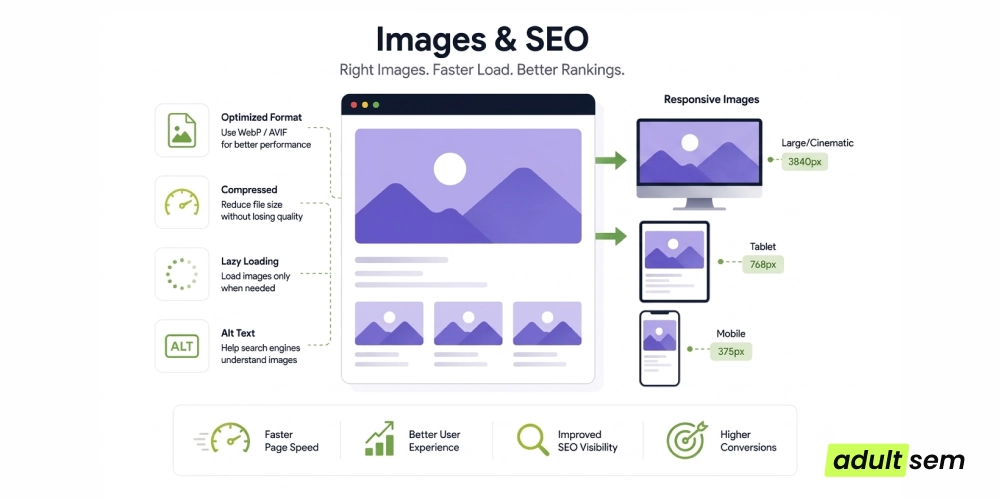
While images tend to be one of the biggest components adding weight to pages, it would be a mistake to think that the answer lies in “using fewer images.” The key is using the proper image, of the proper size, with discoverability and accessibility intact.
- Compress your images and use appropriate file formats when feasible and supported.
- Use responsive images to avoid sending unnecessarily large images to small devices.
- Lazy load only below-the-fold images, not primary content.
- Use intrinsic image sizing to avoid layout shifting.
- Provide meaningful alt attributes for images that communicate information.
- Ensure the URL for images is crawlable if you want search visibility from image searches.
- Look at your image-heavy templates through the lens of Search Console and performance testing, not just the way they look on desktop.
6. Internal Linking Connects Design With SEO
Navigation links tell people where to go. Contextual internal links explain why another page is relevant. That distinction matters when building topic clusters.
Pillar Page
↓
Cluster Page
↓
Supporting Content
↓
Relevant Conversion Page
For example, a page about adult website design can naturally reference technical SEO guidance, an SEO audit service, and a related article on adult keyword research. Google recommends that important pages have links from other pages and that anchor text be descriptive, concise, and relevant.
7. Content Hierarchy Helps Both Users and Search Engines
An effective content hierarchy allows the page to be comprehensible even without analyzing each sentence. This can be done by using a single H1, logical H2/H3, an introduction, descriptive link text, supporting content, and useful FAQs.
- Single H1 that relates to the subject matter of the page.
- Logical use of H2 and H3 instead of just larger headings for no other reason.
- Key explanatory content present in HTML, instead of being behind useless tabs or interactions.
- Descriptive link text and not just "Click here" and "Read more".
- Only useful FAQs that actually solve user problems.
8. UX Friction Can Reduce the Value of Organic Traffic
Organic traffic does not end there. If a user lands on a site that throws up walls in the form of overlays, auto-playing media, dysfunctional controls, and even difficult mobile site design right at that point when he or she is deliberating about staying or leaving, that is friction.
Bad UX → User frustration → Less useful visit → Lower conversion opportunity
- Aggressive popups that obscure the main content.
- Intrusive interstitials that make the page difficult to use.
- Autoplay or media that creates unexpected bandwidth or attention costs.
- Excessive advertising around the main content.
- Forced redirects or unclear navigation paths.
- Broken buttons, filters, or forms.
- Pagination that fragments content without a clear user benefit.
- Slow third-party scripts that add little value.
Google’s page-experience guidance specifically asks site owners to consider whether ads distract from or interfere with the main content and whether intrusive interstitials make pages difficult to use.
9. Design Mistakes That Can Hurt Adult SEO
Design Mistake |
SEO Risk |
UX Consequence |
Recommended Fix |
|---|---|---|---|
| Orphan pages | Weak discovery and poor internal context. | Users cannot easily find related resources. | Add contextual internal links from relevant pages. |
| Excessive JavaScript dependence | Important content or links may be harder to render or parse. | Slower interaction and fragile navigation. | Keep primary content and links accessible in HTML. |
| Poor mobile navigation | Mobile users may miss content and conversion paths. | More friction on small screens. | Simplify menus and test real devices. |
| Oversized media | Higher page weight and slower loading. | Longer waits, especially on mobile. | Compress, resize and serve responsive assets. |
| Confusing URL hierarchy | URLs provide weak contextual information and may complicate crawling. | Users cannot predict where a URL leads. | Use logical, readable paths. |
| Weak internal linking | Important pages can become difficult to discover. | Related information feels disconnected. | Build contextual links and related-content paths. |
| Intrusive popups | Main content can be obstructed and page experience degraded. | Users have to dismiss UI before reading. | Delay or remove nonessential interruptions. |
| Hidden primary content | Search engines or users may not access content as intended. | Information feels incomplete. | Keep essential content directly accessible. |
| Duplicate templates with little unique value | Many similar URLs may add little search value. | Users see repetitive pages. | Consolidate or differentiate pages meaningfully. |
| Thin category pages | Category URLs may provide little standalone value. | Users get little guidance before clicking deeper. | Add useful category context and navigation. |
| Slow third-party scripts | Long tasks can damage responsiveness. | Buttons and menus feel sluggish. | Audit scripts and remove nonessential dependencies. |
| Inconsistent canonicalization | Signals about preferred URLs become ambiguous. | Duplicate experiences can coexist. | Choose a canonical strategy and implement it consistently. |
10. A Better Website Design Framework for Adult SEO
A practical redesign should be staged rather than treated as a visual refresh. Start with the foundation, then work outward toward experience and measurement.
Foundation → Architecture → Navigation → Content hierarchy → Internal linking → Performance → Mobile UX → Accessibility → Structured data → Conversion UX → Monitoring
For an adult website, perform a separate technical and compliance review, as well as classification of the content. There is an adult content rating meta tag for the sexually explicit pages offered by Google. Notably, the use of this tag on non-explicit pages leads to the filtering of such pages by SafeSearch. This is one of the reasons why it is worth keeping indexing/SEO issues, SafeSearch behavior, ad serving, and compliance as different streams of work rather than one vague “adult SEO penalty.”
11. Frequently Asked Questions
Does website design impact SEO?
Yes, mostly through the technical and usability aspects controlled by the design: crawlable links, page structure, mobile usability, performance, internal linking, and content delivery. The design does not ensure rankings, but bad execution might make the necessary information harder to find, read, and access.
Why is mobile design critical for adult SEO?
Google indexes and ranks your site based on the mobile version of its content. Therefore, mobile design must be able to uncover the information and links you want Google to know about, not simply make the desktop versions more compact.
Is slow loading of a page a problem for adult websites?
It may lead to a negative user experience and impact Core Web Vitals. Core Web Vitals are used by Google in its ranking algorithms; however, good scores don’t mean automatic high rankings.
How does internal linking influence adult SEO?
Internal links assist users in moving around the site and help Google to discover and understand pages and their interrelations. Contextual links are particularly helpful when linking similar service, category, and informational pages.
Should adult sites employ structured data?
Structured data should be used if one of its supported types fits the content of the site. This can potentially help Google understand the content and allow for some search features, but not necessarily result in rich results.
How to make the design of the website more crawler-friendly?
Create proper URLs, crawlable links, proper navigation, and HTML. Do not rely on user interaction as an element that is needed to access critical parts of the site.
Does design impact conversion rates through organic search?
Yes, design may impact conversion rates after the click because it is related to usability, page speed, navigation, conversion paths, and other aspects influencing user actions.
12. Final Takeaway
Adult SEO is not just about producing more pages. An architecture should be in place to make it easy for users and search engines to find, comprehend, navigate through, and utilize these pages. When the elements of good design, technical SEO, content structure, and conversion paths are integrated, the website becomes very comprehensible to everyone concerned.